Opens in a new tab

Reporting4Act Pro

Reporting4act is quite simply the most powerful, easy to use reporting product on the market for your Act! CRM data. And now it’s available in three different tiers to fit every budget.
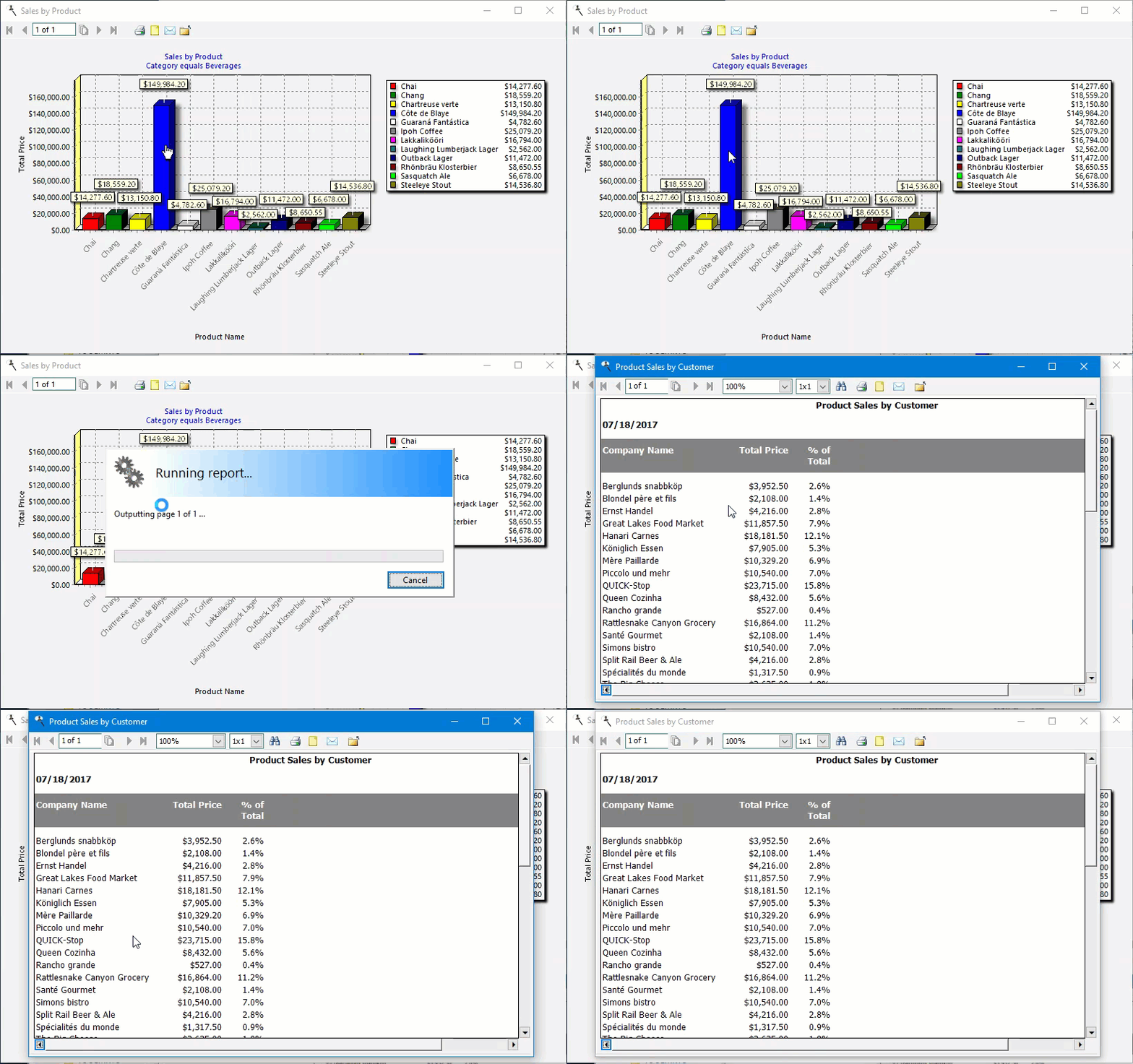
 
Reporting4act provides a step-by-step method to create professional business reports from information stored in Act!. Anyone can create detailed reports, high level overview, drill-down, charts/graphs, pivot tables, and more in minutes rather than hours. What’s more, it’s ready to report on custom tables in the Act! Premium Plus, as well as Tables4act, Topline Designer, and Durkin Tables.
 
Reporting4act actually rewards you for your efforts in putting data into Act!. Create detailed reports and know what is happening with prospects and clients. Analyze opportunities and learn why they closed or were lost. Scan through the call list and read the details quickly to determine how to prioritize calls and more. 
 
Image
 
 
We know Act!

Reporting4act knows the Act! database structure, and has been delivering industry leading reporting solutions for years. With three new tiers to fit everyone’s budget, Reporting4act has the following special features:

Sample Reports

Get started immediately with our sampel reports! Reporting4act comes with 100+ sample reports that can be run or used as a starting point for report design, and used with our Basic viewer program in runtime.

Charts, Graphs, and Dashboards
Create bar, graph, line, area, and pie charts as well as series charts and graphs. Dashboards combine multiple charts into one consolidated view of your data. Zoom in and out on the dashboard, update individual reports manually, and output the dashboard to file.
 
Report on your favourite Act! verticals
Provides critical feedback on popular vertical addons like Act4wealth, Act4mortgages, and Act4support by delivering insightful and clear reporting on the composition of your book of business, or by analyzing which support technicians are logging the most tickets and time.
 
Report on most versions of custom tables

Reporting4act can report on custom table data built with Act! Premium Plus, Tables4act, Topline Designer and Durkin Impact (Durkin requires R4A Ultimate). Reporting4act detects the available custom tables in a database, and all the fields therein, and makes them available for reporting – including the nested relationships between custom sub-entities.

Reporting made simple
Reporting4Act! walks you through the reporting process in 6 easy-to-follow steps so you can be building professional reports in minutes, not days.
 
Schedule and Automatically Deliver Reports
Automatically deliver reports via e-mail, file, or printer. Schedule them to run anytime you need them to, and never miss a reporting commitment to your peers, customers, or vendors (requires R4A Ultimate)
 
Filters & Exclusions
Filters allow you to narrow down your results without programming and more in depth than Act!’s advanced queries, such as all record managers with closed opportunities in the last 30 days. 
Exclusions allow you to report on things not recorded in Act!, such as all contacts that have not been called in the last year or all contacts that do not have an opportunity in the last 60 days.
 
QuoteWerks support
Can report on information in QuoteWerks, a quoting system that integrates with Act!.
 
 
Microsoft Excel PivotTable Reporting
Extended your data analysis with Microsoft Excel PivotTables.
$300AUD
BUY AUD

AUD per user designing report templates plus GST. Compatible with Act! v18-v24. $75 per user only running report templates.
Please note that upgrading Act! may require the purchase of a new version of this add-on. Ongoing updates $75 per year.
Also available Premium $600 & Ultimate $1200 per user designing reports (ongoing updates $150 & $300 respectively per year).

28-Day Guided Trial

Set Up Properly, Decide with Confidence

The 28-day extended trial is designed for businesses that want to experience Act! Advantage working inside their business, not just explore features.

To access the extended trial, you’ll book an initial session with an Act Today consultant based in Australia or New Zealand. During this session, we’ll help you set up three key CRM functions that matter most to your business, such as client follow-ups, communication workflows, retention tracking, or referral visibility.

At the 14-day mark, you’ll have a second check-in with your consultant to answer questions, refine your setup, and remove any roadblocks. This ensures you’re not left guessing and that the system is actually supporting your work.

By the end of the 28 days, you’ll know exactly how Act! Advantage fits your business and whether it delivers real value.

What you’ll get from the 28-day extended trial:

  • Guided setup by a local Act Today CRM consultant
  • Three high-impact CRM functions configured for your business
  • A mid-trial review to answer questions and fine-tune usage
  • A realistic view of outcomes, not just features
  • Confidence to decide based on real experience
START YOUR EXTENDED TRIAL

14-Day Free Trial

Get Hands-On with Act! Advantage CRM

The 14-day free trial gives you full access to Act! Advantage CRM so you can explore how it works in your own time. This is the standard Act! trial used by businesses across Australia and New Zealand who want to see the platform before making a decision.

During the trial, you can add contacts, explore client records, test communication tools, and see how Act! Advantage handles day-to-day client management. It’s a straightforward way to understand how the system is structured and whether it feels right for how you run your business.

This option suits businesses that are comfortable exploring software independently and already have a clear idea of what they want from a CRM. There’s no obligation, no setup required, and no pressure,  just time to assess fit.

What you’ll get from the 14-day free trial:

  • Full access to Act! Advantage CRM features
  • A clear look at how contacts, activities, and communication are managed
  • The ability to test the system across desktop and mobile
  • A simple, no-commitment way to assess fit
  • Confidence before taking the next step
START YOUR TRIAL

Download the FREE Guide

How to Choose the Best CRM for Your Business