
If you use Custom Tables in Act!, you’re in for a treat. APC26.18 brings one of the biggest user experience upgrades Custom Tables has seen — faster, cleaner, and a whole lot more intuitive to work with day to day.
We’ve modernised the entire interface: no more disruptive pop-up windows, redesigned grids, streamlined editing screens, and smoother navigation throughout. The goal? Less clicking, less waiting, fewer interruptions — and an experience that finally feels like a natural part of Act!, rather than a bunch of separate browser windows bolted on the side.
If you’re not already using Custom Tables, contact us about adding this to your subscription.
Here’s what’s changed:
1. No more pop-up browser windows
Previously, almost every action — adding a record, editing a record, choosing columns, reassigning contacts — launched a brand-new browser window. Those windows could be blocked by the browser’s popup blocker, could open behind the main window, could be sized awkwardly, and looked nothing like the rest of Act!.

Now:
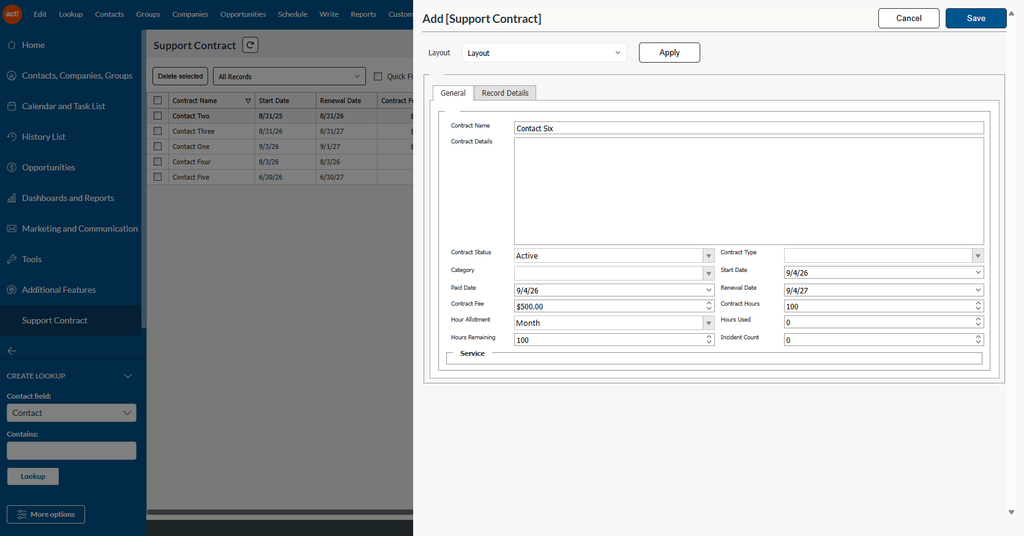
- Adding and editing a record opens in a side panel (drawer) that slides in over the current screen.
- Customize Columns, Duplicate Records, Reassign, and the batch field tools (Replace / Copy / Swap / Append) open as modal windows centred inside Act!.
- Confirmation and message boxes — for example “Do you really wish to delete the selected records?” — now use a styled dialog box that matches Act!’s look, instead of the browser’s plain grey alert popup.

Why it matters: no more pop-up blocker problems, no lost windows hiding behind the browser, and a consistent visual experience throughout.
2. Redesigned list and grid screens

The table grid has been visually rebuilt to match Act!’s current design language.
- A new header bar shows the table’s icon and name, a refresh button, and a prominent “Add new [Table Name]” button on the right.
- The old row of small icon buttons has been replaced with a clean toolbar: Delete selected, Assign, the query selector, and the Quick Filter / Group / Summary / Child Table toggles.
- Export list and Customize columns now sit together on the right-hand side, with Export as a proper drop-down menu (Excel or CSV).
- Buttons, checkboxes, dropdowns, and grid headers now use a shared Act! colour palette, so everything is visually consistent across every screen.
- The selection checkbox column is always pinned to the far left, so it can’t get lost among your other columns.
- Clicking a row’s checkbox now also highlights that row, making the current selection obvious.
3. Screens no longer reload the whole page:

Toggling Quick Filter, Group, Summary, or Child Table used to reload the entire tab. Those actions now update just the grid, so:
- The page no longer flickers or jumps back to the top.
- Your place in the record list is kept.
- Switching between tabs is noticeably faster.
4. Better exporting
Exporting to Excel or CSV has been reworked behind the scenes.
- The file is now generated and delivered without disturbing the page you’re on.
- After the download completes, the screen refreshes itself automatically and returns to a working state — previously an export could leave the grid in an odd state.
- A built-in safety timeout means the screen won’t sit waiting forever if something goes wrong.
5. Editing records
- The Edit Record panel now has a sticky header — the record title and the Cancel / OK buttons stay visible at the top while you scroll through a long form, so you never have to scroll to the bottom to save.
- Saving now closes the panel and refreshes the underlying list automatically.
6. Customize Columns screen redesigned

- Rebuilt with the new Act! styling: a clear title, Cancel and OK buttons in the header, and cleaner “Available fields” / “Selected fields” lists.
- The record-type selector and field lists are easier to read and scroll.
- Saving your column choices immediately updates the grid behind it.
7. Contact / Company / Group / Opportunity pickers
The “Reassign” pickers were rebuilt:
- They now open as properly sized modal windows (previously an oversized 1024-pixel pop-up) and are much easier to work with.
- Selections are correctly remembered while you move around the picker.
- Multiple pickers on the same screen no longer interfere with one another — previously they could share and overwrite each other’s selections.
8. Duplicate Records
The “duplicate the selected records” prompt has been moved from a pop-up window into a proper modal dialog, with the same Yes / No / Please wait / Complete steps as before, just cleanly presented inside Act!.
Summary
While many of the enhancements in APC26.18 happen behind the scenes, their impact is immediately noticeable in day-to-day use. Whether you’re editing records, exporting data, customizing views, reassigning relationships, or managing large tables, every interaction is now more consistent, responsive, and user-friendly. This release lays the foundation for future improvements while delivering a significantly more modern and productive Custom Tables experience for Act! users today.