Opens in a new tab

MailChimp Plugin III for Act!

Send MailChimp campaigns without leaving Act!. Import your MailChimp subscribers and campaign results into Act! as well as export contacts from Act! to MailChimp.

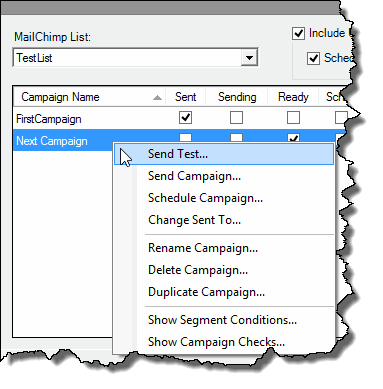
Manage your MailChimp campaigns directly from within Act!.

With the MailChimp Plugin II you can send or schedule a MailChimp campaigns without leaving Act!. You can create new campaigns based on existing campaigns, assign them to a list or segment of a list and send it right away or schedule it. You don’t even need to go to the MailChimp web site unless you want to create a new campaign from scratch.
mailchimp plugin1

Import MailChimp data into Act!

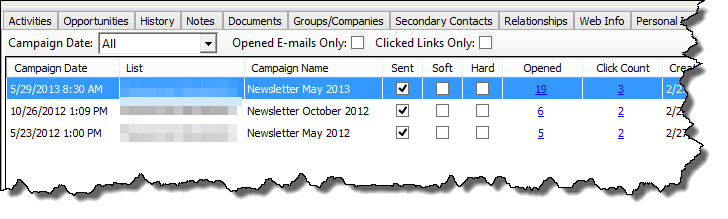
MailChimp Plugin II for Act! allows you to import subscribers and campaign results from MailChimp as well as export contacts from Act! to MailChimp. Your campaign results are neatly organised under a MailChimp tab, automatically added to your Contact Detail view.

Importing campaign results offers you the ability to lookup and analyse the results.

  • With just a few click within Act!, you can see:
  • Who actually opened the email you sent the other day.
  • Contacts that clicked a link in a campaign, see which link was clicked and at what time.
  • Whose email bounces repeatedly.
  • Who has not been contacted yet.

mailchimp plugin2

$135AUD
BUY AUD
$149NZD
BUY NZD

Compatible with Act! v22-v25. Another version of this addon is available for older Act! versions.

per user per year (GST added at checkout for AU/NZ customers).

Two-year subscription available here for $220 AUD per user plus GST.

28-Day Guided Trial

Set Up Properly, Decide with Confidence

The 28-day extended trial is designed for businesses that want to experience Act! Advantage working inside their business, not just explore features.

To access the extended trial, you’ll book an initial session with an Act Today consultant based in Australia or New Zealand. During this session, we’ll help you set up three key CRM functions that matter most to your business, such as client follow-ups, communication workflows, retention tracking, or referral visibility.

At the 14-day mark, you’ll have a second check-in with your consultant to answer questions, refine your setup, and remove any roadblocks. This ensures you’re not left guessing and that the system is actually supporting your work.

By the end of the 28 days, you’ll know exactly how Act! Advantage fits your business and whether it delivers real value.

What you’ll get from the 28-day extended trial:

  • Guided setup by a local Act Today CRM consultant
  • Three high-impact CRM functions configured for your business
  • A mid-trial review to answer questions and fine-tune usage
  • A realistic view of outcomes, not just features
  • Confidence to decide based on real experience
START YOUR EXTENDED TRIAL

14-Day Free Trial

Get Hands-On with Act! Advantage CRM

The 14-day free trial gives you full access to Act! Advantage CRM so you can explore how it works in your own time. This is the standard Act! trial used by businesses across Australia and New Zealand who want to see the platform before making a decision.

During the trial, you can add contacts, explore client records, test communication tools, and see how Act! Advantage handles day-to-day client management. It’s a straightforward way to understand how the system is structured and whether it feels right for how you run your business.

This option suits businesses that are comfortable exploring software independently and already have a clear idea of what they want from a CRM. There’s no obligation, no setup required, and no pressure,  just time to assess fit.

What you’ll get from the 14-day free trial:

  • Full access to Act! Advantage CRM features
  • A clear look at how contacts, activities, and communication are managed
  • The ability to test the system across desktop and mobile
  • A simple, no-commitment way to assess fit
  • Confidence before taking the next step
START YOUR TRIAL

Download the FREE Guide

How to Choose the Best CRM for Your Business