
Link2Calendar
Publish your Act! calendar so people can see when you’re available and book a time with you, adding appointments immediately to your calendar, and notifying both parties of the booking.

Whether you’re in sales or service, time is likely your most valuable asset. Ironically, though, managing that time with your customers is often clumsy and fraught with needless delays, as vendors & customers go back and forth playing “email ping-pong”, struggling to agree upon a mutually convenient time to meet. And in business, wasted time is wasted money.
Link2calendar solves this problem by sharing your Act! calendar online with those people trying to book your time. With one click, your customers will see your availability displayed ins simple time blocks of your choosing, and provide them a convenient way to pick the earliest opportunity you both can meet. When an online booking is made, you’ll get alerted immediately of the new appointment by email, and the customer will also receive an email and an invite for their own calendar. What could be easier?
Display your Link2calendar link in your email signature, website, social media pages, or any other digital presence you manage, and then watch your calendar magically fill up with customer appointments.
Why use Link2Calendar?
- Automated Scheduling: Link2calendar aligns, syncs, and integrates everything around your meetings to add time and focus back to your workday.
- Powerful Features: Link2calendar offers a range of powerful features designed to make meeting scheduling as simple and painless as possible. Its best features include custom notifications, meeting reminders, Act! calendar integration, team scheduling, blackout periods, multiple activity types, billing for booked time, mobile responsive interface, and more.
- Ease of Use: Link2calendar is very easy to use and has excellent mobile support. Even those who aren’t technically savvy won’t have any trouble working their way around the app.
- Great Integration: Link2calendar seamlessly integrates with Act! Premium and Premium Cloud through the Act! Web API, and it instantly checks calendars to avoid schedule conflicts or double-booking.
- User Experience: Its UX is intuitive for most people, so it’s easy to get started. The setup is self-explanatory and supports the use of virtual rooms to reduce the manual assignment of specific join links.
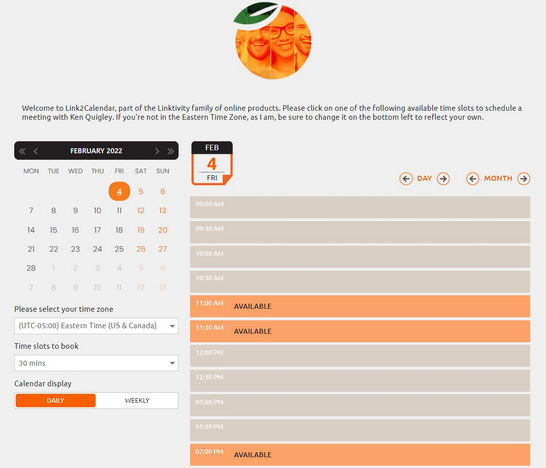
Display Calendar
Show your customers when you’re available for an appointment with your own unique calendar link
Let them book online
Provide them the ability to book an appointment with you and have it show up immediately in your Act! calendar
Send them an invite afterwards
Link2calendar then offers to send them an Outlook invite for the same date and time so both participants are reminded of that appointment when due. It even links the invite to your chosen email address.
Update or add Act! Contacts
If the contact is in your database the activity is linked to them, and if they’re not, they get added and then linked. In cases of existing contacts, no field data gets overwritten
Get all the meeting details
Appointments in your Act! calendar contain all the meeting details entered in Link2Calendar, including description, participant, priority and location (when applicable).
Display your calendar everywhere
Easily display your availability on all digital spaces you manage, including websites, social media, email signatures, online directories, you name it.
Customizable
Configure your customer facing appointment page with your own custom messages and corporate logo
Blacklist days
Set one-time or recurring blacklist dates, minimum lead times, same-day blocking, meeting buffers, and even custom work week availability (including regular hours and days).
Default activity types
Set default activity type, duration, and alarm notice in Link2calendar that transfer to Act! with each booking
Instant Notification of Bookings
Get an instant email alert whenever a booking is made, advising you with whom and when.
Set your own work week
Link2calendar let’s you customize what days and times of the work week you wish to display as available to accept appointments.
Works with Local & Web databases
Link2calendar let’s works with Cloud databases using the WebAPI, and local databases using Act! Connect Link. As long as you have an Act! subscription, you can take advantage of any of our Linktivity products.
Organize into Teams
Link2calendar now helps you organize into Teams. If you want your customers to book with the next available Sales, Support, or Admin staff, create teams for each department and your customers can book with the first available team member.
Integrate with other Linktivity products
Link2calendar is only one part of our Linktivity Suite of products. Learn how to integrate Link2events, Link2forms, Link2list, and Link2quotes to save time and money.
per user per database per year (GST added at checkout for AU/NZ customers).
Requires a current Act! subscription (Act! v18 or higher); Act! security role of “Standard” or higher, with WebAPI permissions assigned; Act! Premium Cloud or Act! Premium with a WebAPI URL, or locally install Act! Connect Link.
