Opens in a new tab

Keystroke Designer

Custom table functionality for the desktop

Expand the functionality of Act! with custom tables for tracking customer service, support, projects, manufacturing, and more. Keystroke Designer allows you to add custom tabs at the contact, company, group, or opportunity level.


Keystroke Designer includes templates for industries such as real estate, healthcare, and financial management along with general management solutions such as contracts, equipment, and event planning.
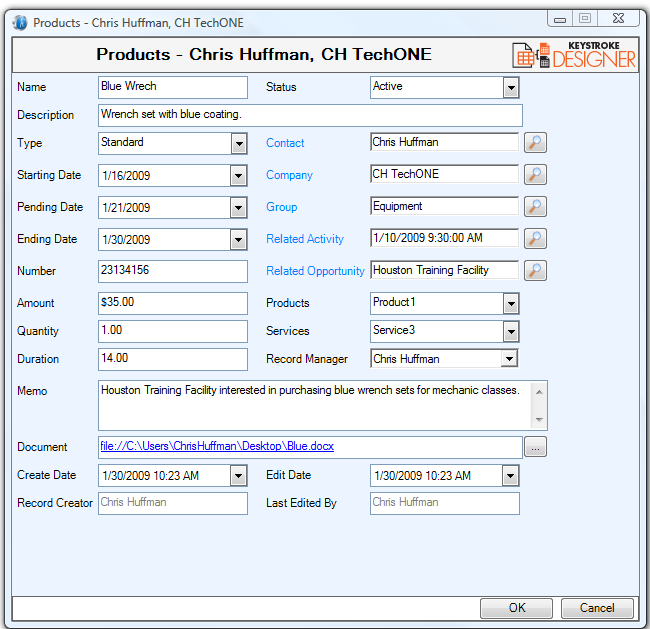
designerpopup


Compatibility
  • Custom tables work within all versions of desktp Act! – Pro and Premium,
Part of your database
  • Custom Tables are part of your database, and therefore fully synchronization enabled, and upgrade with your database.
Drillable Data
  • Drill down on a custom table list view to access the detail view, and click to sort or filter in the list view.
One-to-many
  • Create an unlimited number of functional, manageable “one-to-many” table-format tabs for Contacts, Companies, Groups, and Opportunities in Act!
Lookups
  • Convert a custom table look up to a Contact, Company, Group or Opportunity lookup
Filters
  • Search within tables and filter results for superior lookups
Merge Data
  • Allows you to merge to Word or Email templates from a custom table lookup, and export list views with customizable columns to MS Excel.
Nesting Tables
  • Nest Tables within tables to further enhance & extend the capabilities of Act!
Downloadable Schemas
  • Customize your database fast with ready-to-go schemas for loan management, inventory, tech support, realty, mortgages, consulting, insurance, car sales, and many others.
Calculations
  • Perform advanced calculations among fields to automate data entry and reduce occurences of missing data.


Why Keystroke Designer is right for Act! users


Ready, set, design!

Keystroke Designer leverages the capabilities of custom tables in Act! by creating new subentities for contacts, companies, groups or opportunities. Keystroke Designer allows you to create and use the tables, organize your views, or search and report on any custom table available in your database.

Easy to navigate. Easy to use

Feel right-at-home in this simple interface which reinforces common navigational features among screen layouts, tabs and lists, and create on-the-fly queries and advanced look-ups. Create quick reports and documents with robust Microsoft Office integration: export to Excel, mail merge to Word for multiple contacts, email multiple contacts via Outlook.

Wizard driven. Fast to build. Flexible to import

Get started with your data using the advanced data import and data update wizard. Build custom features with Keystroke Designer snippets and scripting editor. Create parent-child relationships among custom tables. Schedule and link Act! activities and opportunities from the custom tables.

Business-friendly solutions

Keystroke Designer includes modules to address general business needs as well as database templates for specific industries.

 
$120AUD
BUY AUD
$132NZD
BUY NZD

per computer per year (GST added at checkout for AU/NZ customers).

28-Day Guided Trial

Set Up Properly, Decide with Confidence

The 28-day extended trial is designed for businesses that want to experience Act! Advantage working inside their business, not just explore features.

To access the extended trial, you’ll book an initial session with an Act Today consultant based in Australia or New Zealand. During this session, we’ll help you set up three key CRM functions that matter most to your business, such as client follow-ups, communication workflows, retention tracking, or referral visibility.

At the 14-day mark, you’ll have a second check-in with your consultant to answer questions, refine your setup, and remove any roadblocks. This ensures you’re not left guessing and that the system is actually supporting your work.

By the end of the 28 days, you’ll know exactly how Act! Advantage fits your business and whether it delivers real value.

What you’ll get from the 28-day extended trial:

  • Guided setup by a local Act Today CRM consultant
  • Three high-impact CRM functions configured for your business
  • A mid-trial review to answer questions and fine-tune usage
  • A realistic view of outcomes, not just features
  • Confidence to decide based on real experience
START YOUR EXTENDED TRIAL

14-Day Free Trial

Get Hands-On with Act! Advantage CRM

The 14-day free trial gives you full access to Act! Advantage CRM so you can explore how it works in your own time. This is the standard Act! trial used by businesses across Australia and New Zealand who want to see the platform before making a decision.

During the trial, you can add contacts, explore client records, test communication tools, and see how Act! Advantage handles day-to-day client management. It’s a straightforward way to understand how the system is structured and whether it feels right for how you run your business.

This option suits businesses that are comfortable exploring software independently and already have a clear idea of what they want from a CRM. There’s no obligation, no setup required, and no pressure,  just time to assess fit.

What you’ll get from the 14-day free trial:

  • Full access to Act! Advantage CRM features
  • A clear look at how contacts, activities, and communication are managed
  • The ability to test the system across desktop and mobile
  • A simple, no-commitment way to assess fit
  • Confidence before taking the next step
START YOUR TRIAL

Download the FREE Guide

How to Choose the Best CRM for Your Business