Opens in a new tab

Call-Aid (click to dial)

Call-Aid for Act! is a Dialer Add-on that works with the Desktop Version of Act! and with your VOIP softphone, Microsoft Teams, 3CX, Skype, Magic Jack, and even TAPI devices.

Send text messages straight from Act!

Call-Aid makes dialing from Act! easy and accurate, while ensuring you and your team always are prompted to record the History of the call, as well as follow-ups, as required. Call-Aid is licensed per activation (one-time fee), and contains an integrated updater to easily receive in-version program updates.

Features

Call-Aid is as simple to use as it is reliable. Simply click the Call-Aid icon in front of the phone field you wish to call, and it launches your softphone and dials the number. When the call is complete, the user simply completes the custom History dialogue box, and the History is recorded for that contact, along with the exact duration of the call.
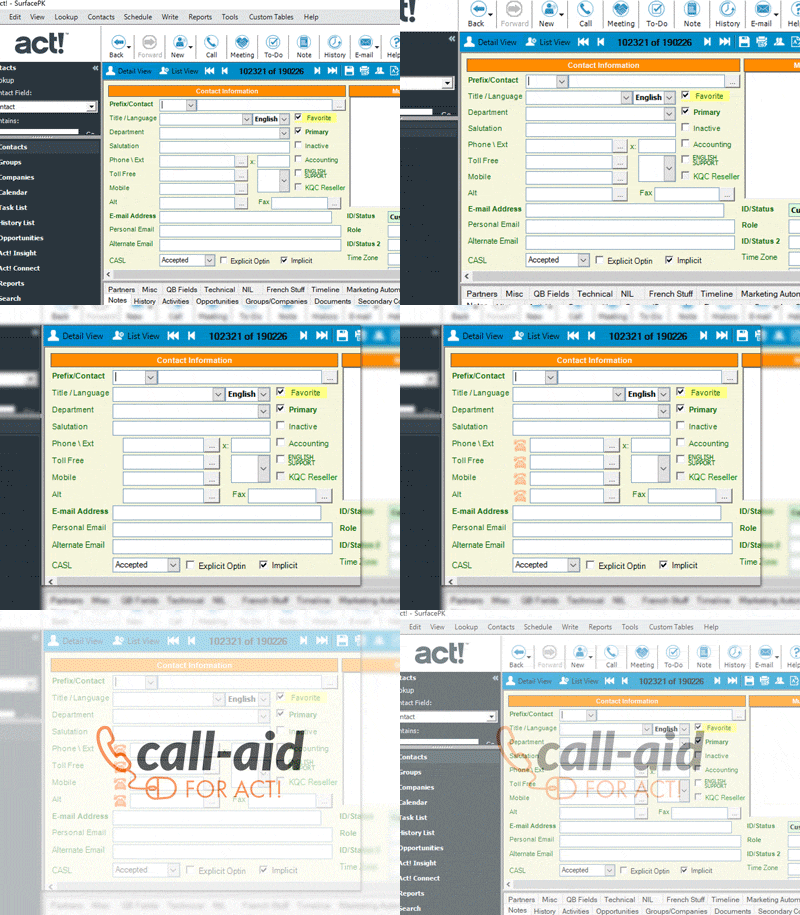
call aid

Features:

  • Click-to-dial launches user’s softphone (VOIP, Skype, MagicJack), as well as TAPI calls for users with modems
  • Custom History recording dialogue box that times your calls and makes sure your logging is accurate and consistent (available from the toolbar, as well, to use separately)
  • Custom History dialogue box also support dynamic positioning. Where ever you last positioned it, it will reappear in the same place the next time it’s invoked with a call.
  • Auto-positions dialer icons on your layout, allowing you to choose to the right or left of the phone fields, and avoids fax fields.

Setup Instructions

  1. Please download the Call-Aid add-on installer
  2. With Act! closed, run the setup to complete the installation
  3. Launch Act! and select “Try” when the registration screen pops up
  4. From within Act!, click Tools > Call-Aid preferences > Options
  5. From the drop down select “softphone”
  6. Click the “Softphone” tab, and then click the ellipsis at the end of the Program path field to browse to your softphone executable and select. (Skype, Magic Jack, and TAPI users select accordingly)
  7. The command line arguments should automatically populate once you select your softphone executable. In most cases it will be “-action=call?to=[#]“, without the quotes
$110AUD
BUY AUD
$121NZD
BUY NZD

per user per computer (GST added at checkout for AU/NZ customers).

Please note that upgrading Act! may require the purchase of a new version of this add-on.

28-Day Guided Trial

Set Up Properly, Decide with Confidence

The 28-day extended trial is designed for businesses that want to experience Act! Advantage working inside their business, not just explore features.

To access the extended trial, you’ll book an initial session with an Act Today consultant based in Australia or New Zealand. During this session, we’ll help you set up three key CRM functions that matter most to your business, such as client follow-ups, communication workflows, retention tracking, or referral visibility.

At the 14-day mark, you’ll have a second check-in with your consultant to answer questions, refine your setup, and remove any roadblocks. This ensures you’re not left guessing and that the system is actually supporting your work.

By the end of the 28 days, you’ll know exactly how Act! Advantage fits your business and whether it delivers real value.

What you’ll get from the 28-day extended trial:

  • Guided setup by a local Act Today CRM consultant
  • Three high-impact CRM functions configured for your business
  • A mid-trial review to answer questions and fine-tune usage
  • A realistic view of outcomes, not just features
  • Confidence to decide based on real experience
START YOUR EXTENDED TRIAL

14-Day Free Trial

Get Hands-On with Act! Advantage CRM

The 14-day free trial gives you full access to Act! Advantage CRM so you can explore how it works in your own time. This is the standard Act! trial used by businesses across Australia and New Zealand who want to see the platform before making a decision.

During the trial, you can add contacts, explore client records, test communication tools, and see how Act! Advantage handles day-to-day client management. It’s a straightforward way to understand how the system is structured and whether it feels right for how you run your business.

This option suits businesses that are comfortable exploring software independently and already have a clear idea of what they want from a CRM. There’s no obligation, no setup required, and no pressure,  just time to assess fit.

What you’ll get from the 14-day free trial:

  • Full access to Act! Advantage CRM features
  • A clear look at how contacts, activities, and communication are managed
  • The ability to test the system across desktop and mobile
  • A simple, no-commitment way to assess fit
  • Confidence before taking the next step
START YOUR TRIAL

Download the FREE Guide

How to Choose the Best CRM for Your Business