

Integrating social media into your CRM gives you a fast, simple way to help you understand who your customers are and what’s important to them. You can build greater relationships with your customers that can drive sales and increase your revenue. Additionally, the more connected you are with your customers, the more loyal they will be to your brand.
Integrating social media into your CRM gives you a fast, simple way to help you understand who your customers are and what’s important to them.
By using relevant customer data, you can build greater relationships with your customers that can drive sales and increase your revenue. Additionally, the more connected you are with your customers, the more loyal they will be to your brand.
Act! CRM helps you capitalise on this unique insight by integrating with popular social media platforms, LinkedIn® and Facebook®. The experience is seamless. From the Act! Contact record, you can view your customer’s recent posts together into one centralised view. Once you “Connect” or “Friend” link is made, Act! Social Updates provides you with an insider’s-look by displaying a collection of your customer’s last 25 posts to LinkedIn® and Facebook®, as privacy access allows. You’ll develop a greater understanding of your customer’s needs, opinions, and life events so you can act swiftly with a personalised phone call or a meaningful sales offer and message. Imagine the edge you’ll have! Teams will love the ability to view shared connections in the database, allowing them to expand their network by finding mutual contacts.
Act! Social Updates can benefit you by allowing you to:
1. Capitalise on unique social insight by viewing and interacting with your customers’ LinkedIn and Facebook profiles from within their contact record.
2. Leverage familiar social functionality, such as commenting on posts, endorsing skills and sending private messages to engage with your customers.
3. Improve your sales and marketing effectiveness by actively monitoring your customers’ posts and related sentiments so that you can deliver the right offer and message at the right time.
4. Grow your business and expand your network by finding mutual Facebook friends and LinkedIn Connections to request association – conveniently from within Act!.
5. Enrich Act! contact details by gathering missing or noteworthy customer information from social media profiles, such as updated titles, email addresses, even allowing you to create a history or note containing their personal points of interest.
How to connect Act! with your social media accounts
Start by giving Act! permission to access your social media accounts.
1. Click on the Social Updates tab on the Contact Layout screen.
2. Click on either the LinkedIn or Facebook button at the top of the tab to sign in to your Social Media page.
3. Enter your login credentials.
Start connecting your Act! contacts with the associated social media profile.
4. Lookup a contact in your database.
5. Click the Social Updates tab.
6. Click either LinkedIn or Facebook at the top of the tab.
7. Select the matching profile.
8. Click the Remember This Page hyperlink at the top of the tab.
Note: Once remembered, the page will be remembered for all users who access the database, however, available information may differ from user to user depending on the page owner’s privacy settings and whether they are friends with or connected to your database users.
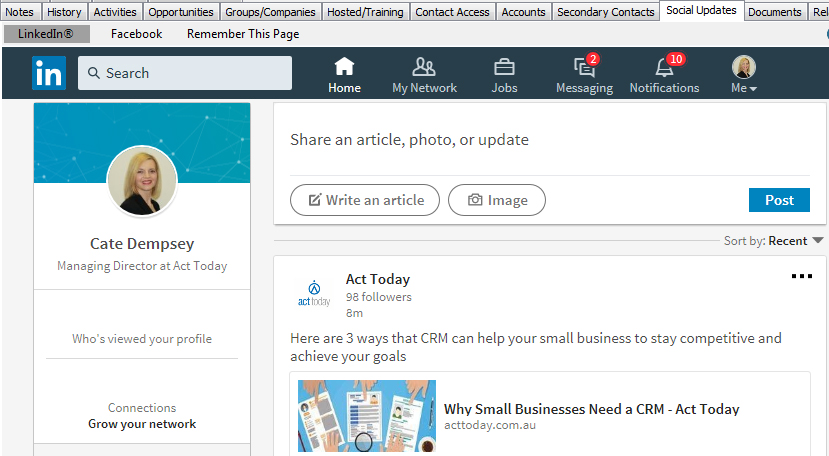
Switching accounts
Since the Social Updates tab is powered by Internet Explorer, it is necessary to log out of your Facebook and/or LinkedIn account, then login to a different account if you decide to use a different account to interact with your customers. This can be done from within the pages displayed in the Social Updates tab, or by launching an Internet Explorer browser window, navigating to the desired social media page, logging out of the original account, then logging into your new account.
Changing the contact association
If you want to change the social media profile that the Act! Contact is associated with, simply browse to a different profile using each respective site’s search bar. When you have located the correct profile, click ‘Remember This Page’ to associate the new profile with the Act! Contact.
Whether you want to sell to customers or retain them, Social Updates within Act! enables you to manage all of your customer data points within a single software source.
For help with connecting your Act! contacts with your Social Media accounts, call us on 1800 362 046 (AU) | 09 428 2281 (NZ) or connect with your Act! CRM Business Partner.